No more scans at the dock door —
every pallet uniquely booked.
FMCG warehouses ship hundreds of pallets a day against tight time windows. AI-powered camera tracking follows every pallet and every batch on its way through the warehouse and onto the truck — after a single initial identification, with no further manual scans, no handheld terminals, no paper.
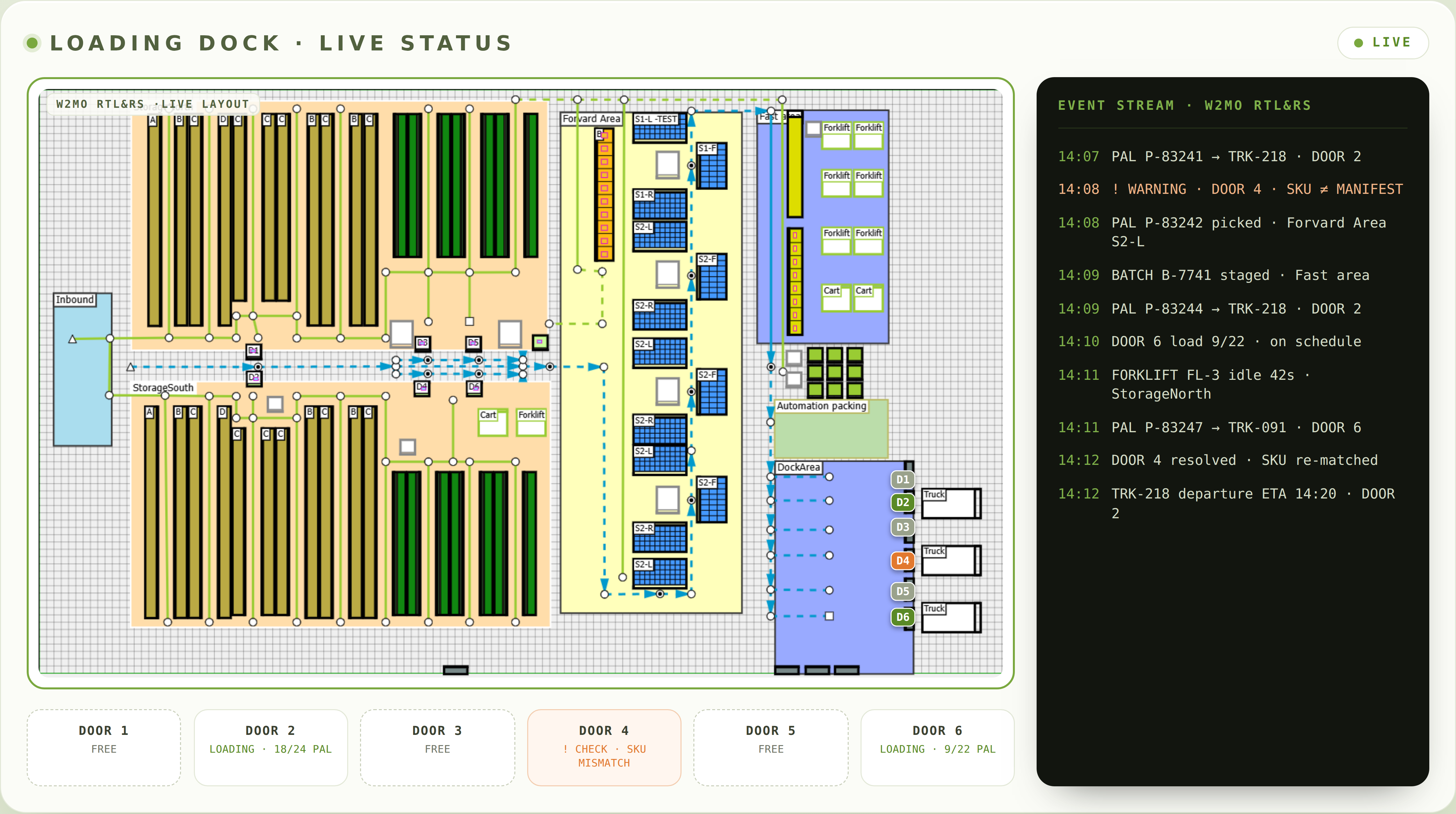
No more scanner mis-grabs — every pallet uniquely captured by camera.
Instead of minutes or hours for claims and audits.
No handhelds, no barcode labels, no manual booking.
Things we hear again and again at FMCG docks.
Five typical situations on the loading dock — you'll recognise at least one of them.
Then the customer complains and nobody knows what was actually on the truck
Truck out, claim in. Scan logs are patchy, the driver can't remember, and in the end you issue a credit note that shouldn't have been necessary.
The scanner's missing again — and people just improvise around it
Dead battery, no Wi-Fi, illegible barcode — and suddenly things get estimated, booked, or not captured at all. Every workaround is a data leak that only shows up after loading.
We don't have a real overview of what each dock is doing right now
Four doors, three trucks in the slots, one waiting in the yard — and dispatch is calling every five minutes. Without a live view, every shipment is a black box until the truck leaves.
After every load, a piece of the story is missing
Which pallet or which batch went when, on which transport, to which customer? The answer lives in three systems, two spreadsheets and one person's head. When the customer calls, someone hunts — and often only finds fragments.
For every audit we start documenting from scratch all over again
Traceability requirements from retail chains, food standards, internal compliance — the data exists somewhere, but never in one place. Weeks of spreadsheet-mining for what a live system could just output.
What plant managers and logistics leads talk to us about.
- Eliminate mis-shipments — assign every pallet to the right consignment
- Document the loading and dispatch process end-to-end
- Get rid of scan steps and still capture everything
- Live overview of every door and every active load
- End-to-end traceability for claims and audits
- Document the loading process — from pallet to transport
- Use load data as a basis for further process optimisation
From the dock to full shopfloor transparency.
Five steps that have proven themselves in comparable projects. Typical project duration: 3 to 6 months — start with dock tracking, expand step by step into the whole hall.
Capture the dock & install cameras
Recording loading processes, positioning the AI cameras above the doors, connecting to the W2MO Real-Time Digital Twin. No interference with existing processes.
Configuration & calibration
The system is tuned to your setup — packaging types, truck types, door layout, WMS/ERP interfaces. Parallel operation with your existing scanner workflow for validation.
Retire scans & switch on the dashboard
When recognition accuracy is solid: the scanner workflow is retired, the live dashboard for dispatch and shift leads goes online. SAP EWM or ERP integration pushes data back instantly.
Add loading documentation (optional)
Alongside movement tracking, you can also document pallet condition and load securing inside the truck. Photos and videos are immediately available for claims — usable as evidence at any time.
Extend to shopfloor (optional)
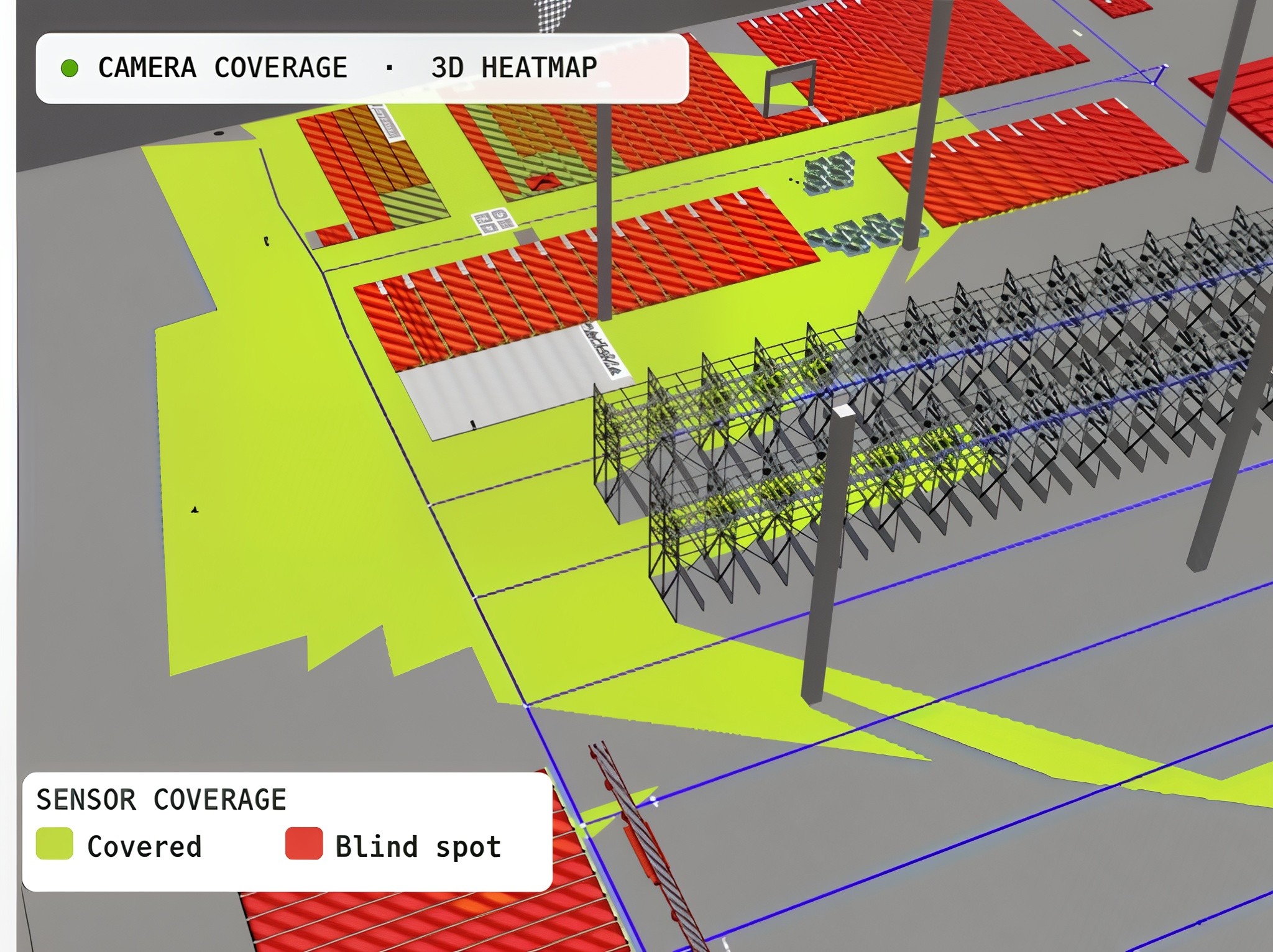
Once dock tracking runs, we add forklift tracking, travel-path heatmaps and utilisation analytics. The cameras are already in place — value grows with every additional zone.
The result isn't just more accurate loading, but a seamless live picture of your logistics processes — right inside the Digital Twin, and extendable at any time from the dock all the way to the last aisle.
Ask your Twin — not your filing cabinet.
The camera data lands in the Digital Twin — and from there, you query the system directly. No report templates, no spreadsheet filters.
Questions instead of reports
"Show me yesterday's loads with discrepancies." "Which pallets went to customer Müller this week?" — answers in seconds, straight from live data, no IT ticket required.
MCP server as the bridge
W2MO's MCP architecture lets AI models access tracking data, loading records and twin models directly — no manual integration work.
Audits at the push of a button
"Give me the traceability evidence for batch X from Monday" — the AI generates the document directly from tracking history, timestamps and dock assignments.
Bring your own AI model
Connect any LLM — Claude, ChatGPT, Gemini, or your own — through the W2MO MCP server. You pick the model, you control the data. No vendor lock-in.
Orders of magnitude we see again and again.
Mis-shipments — every pallet uniquely captured by camera.
Scanner effort — no handhelds, no barcode label work.
Traceability instead of minutes or hours for customer claims.
Live transparency across doors, pallets and loading operations.
FMCG warehouse with 4 dock doors and 300 pallets shipped daily
At 5–10 seconds of manual scan per pallet, you save 25–50 minutes of pure scan time per day — times four doors, times seven days a week. On top of that: a single avoided mis-shipment — return freight, re-shipment, customer penalties — quickly runs into four to five figures per incident. And on the next claim, the proof lies on the table in seconds instead of in a folder.
The ranges depend strongly on dock size, loading volume and existing IT infrastructure. A proof-of-concept at a single door is achievable within a few weeks.
W2MO modules in this use case.
Start with dock tracking — extend to the whole shopfloor whenever it makes sense.
AI-RTL&RS
AI-based Real-Time Location & Recognition System as core infrastructure.
Real-Time Digital Twin
Live mirror of your warehouse with heatmaps, reports and analytics.
Goods tracking
Pallet tracking inside the warehouse — even without fixed slots, without scans.
Workplace safety
Danger-zone monitoring and person-vehicle distance control.
Logivations — trust by the numbers.
What customers ask us before the project.
How reliably does the camera AI recognise a pallet?
The camera doesn't recognise the pallet itself, but the movement — a pallet moving through a door, onto a truck, from one zone to the next. The link to a specific pallet is made through an initial identification, e.g. a scan at the start of the movement chain. From that point on, the system follows the pallet without any further scans. The parallel phase with existing scanners is there precisely to validate this tracking chain before switching over.
What about data protection — cameras in a work area?
This isn't a side issue, it's a core point. The live view automatically pixelates people for privacy. Tracking analysis runs at object level (pallets, trucks, forklifts), not at person level. We bring works council and data protection officers in early as a matter of course — we know this from many rollouts.
Does existing hardware (scanners, MDE) need to be replaced?
Not necessarily. You can keep scanners as a fallback, run in parallel, or retire them gradually. In practice, handhelds at the dock are often the first to become redundant, while they keep running in picking for a while longer.
How does this integrate with SAP EWM or another WMS?
Via the W2MO SAP connector or RESTful APIs. Loading bookings, shipment closures and traceability data flow straight back into the leading system. For your back-office team the workflow doesn't change — only the data source.
How long does a project like this usually take?
A first door in productive recognition is realistic within a few months. Full dock equipment plus integration with existing systems typically lands at 3 to 6 months. After that, rollout to shopfloor tracking can follow in additional stages.
What happens if a camera fails?
The system is redundant — several cameras cover every door, and failures are reported immediately. In the case of a total outage, you can briefly fall back to scanner backup mode; the infrastructure for that remains in place.
Do you recognise your dock in the description?
Three ways to take a non-binding next step.
Talk to an industry expert
30 minutes, tailored to your loading situation — free and non-binding.
Book a slot →See a live demo
A real dashboard with dock tracking and real-time heatmaps from a production system.
Request a demo →Download the whitepaper
"Scanner-free loading — AI tracking for FMCG docks" — technology, approach, worked examples.
Get the whitepaper →